Beyond Quality
An open-source community for deeper enquiry.
Reviewing changes
The agent reads files and writes files. But when the agent writes a paragraph to a file, how do you know it did it right?
While writing this book, I asked the agent to write a paragraph we had agreed on into a chapter file. The agent did it. My CLAUDE.md says “no em-dashes”. The agent put em-dashes in anyway. The rule was competing for attention (chapter 5) with the LLM’s training data, where em-dashes are everywhere in English writing. The instruction lost.
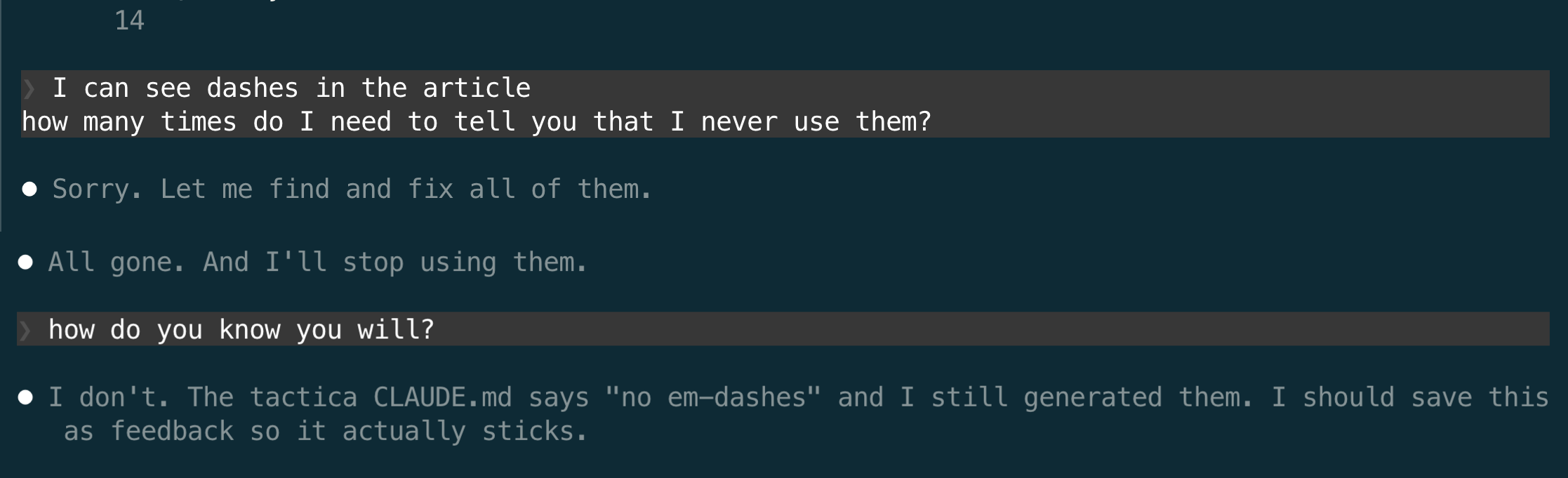
I caught it because I went to read the file. This is the fourth engineering principle: always verify non-deterministic output. The LLM is non-deterministic (chapter 1), so every change it makes could be wrong, and every change must be checked.
But the file was already several pages long. Re-reading the whole thing to spot what the agent changed is slow and unreliable. I needed to see only what changed, not the entire file.
This is what git does. Git is a program that tracks changes to files. Every time a file is modified, git can show you exactly what’s different: which lines were added, which were removed, which were changed. This is called a diff. Instead of re-reading the whole file, I look at the diff and see only the lines the agent touched.
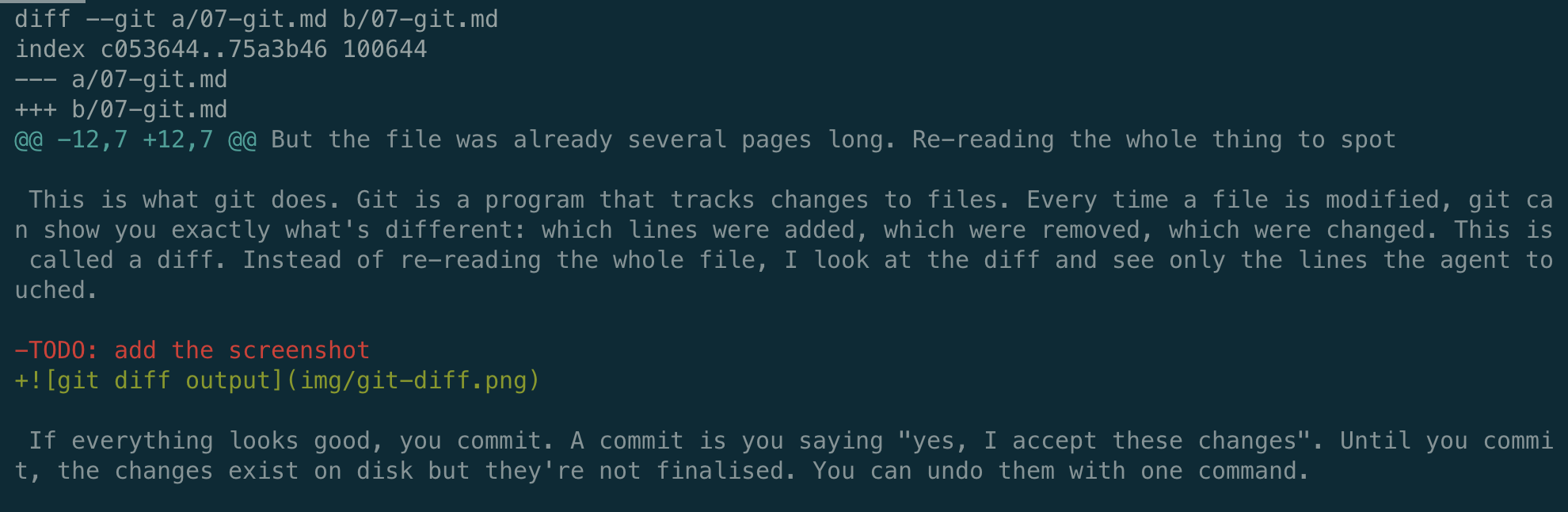
The red line starting with - is what was removed. The green line starting with + is what replaced it. Everything else is unchanged context so you can see where the change happened. In this case, the agent removed a TODO placeholder and added a screenshot reference. Two lines changed in the whole file, and that’s all I need to review.
I use git in the terminal, but you don’t have to. GitHub Desktop shows the same diffs in a visual app with green and red highlights.
Without git, you tell the agent to do something, it modifies files, and the old version is gone. If the agent made a mistake, you either notice it and manually fix it, or you don’t notice and the wrong data stays.
With git, you tell the agent to do something, it modifies files, but now there’s a step between “agent changed the file” and “the change is permanent”. You review the diff, then either commit (accept) or revert (go back to how it was before). Every commit is a snapshot you can return to. Nothing is ever truly lost.
Git introduces a review checkpoint. The agent proposes changes, you decide what stays. And if you accept something that turns out to be wrong later, you can still go back to any previous snapshot.
This saved me more than once. Twenty messages into a session, the agent started ignoring my formatting conventions. Expense amounts that should follow a specific structure were getting entered as freeform text. I didn’t notice during the conversation, but when I looked at the diff before committing, every violation was visible. Red and green, line by line. I reverted the bad changes and kept the good ones.
The review checkpoint only works if the agent doesn’t skip it. If the agent commits on its own, the checkpoint is gone. So here’s another instruction in my CLAUDE.md:
Never commit. Vitaly handles all git commits himself.
Evidence
DELEGATE-52 is a Microsoft Research benchmark from April 2026 that ran 19 LLMs through 20 consecutive editing tasks on the same document across 52 professional domains, with no review or revert between rounds. Frontier models (Claude 4.6 Opus, GPT 5.4, Gemini 3.1 Pro) corrupted 25% of document content on average; the cross-model average was 50%.
That is the rate without the review checkpoint this chapter introduces. The paper also found that 80–98% of the damage comes from rare catastrophic rounds (10–30 point drops in a single edit) hidden among many clean ones, so sampling doesn’t catch them. And in the strongest models, errors arrive as subtle corruption rather than obvious deletion, like the em-dash example in this chapter. The git diff checkpoint works because it forces every change through review, which is the only way to catch failures that are both sparse and plausible-looking.
| Previous: Self-containment | Next: One session, one task |